JasMed Product

The clinic queue that never goes down

JasMed runs a whole clinic offline — token queues and waiting-room TV announcements, prescriptions with drug-interaction alerts, lab reports, billing, and WhatsApp & SMS to patients. One PC is the source of truth for every browser, tablet and TV — no cloud, no downtime.

JasMed · Reception Live
A-042
Now servingOPD 2 · Dr. on duty
Waiting17 tokens
A-042ConsultingOPD 2
A-043WaitingOPD 2
B-018VitalsDental
C-007WaitingEye
128 tokens todayOffline-first
Why JasMed

Everything the waiting room needs

Purpose-built for Indian clinics that need reliability without depending on the internet.
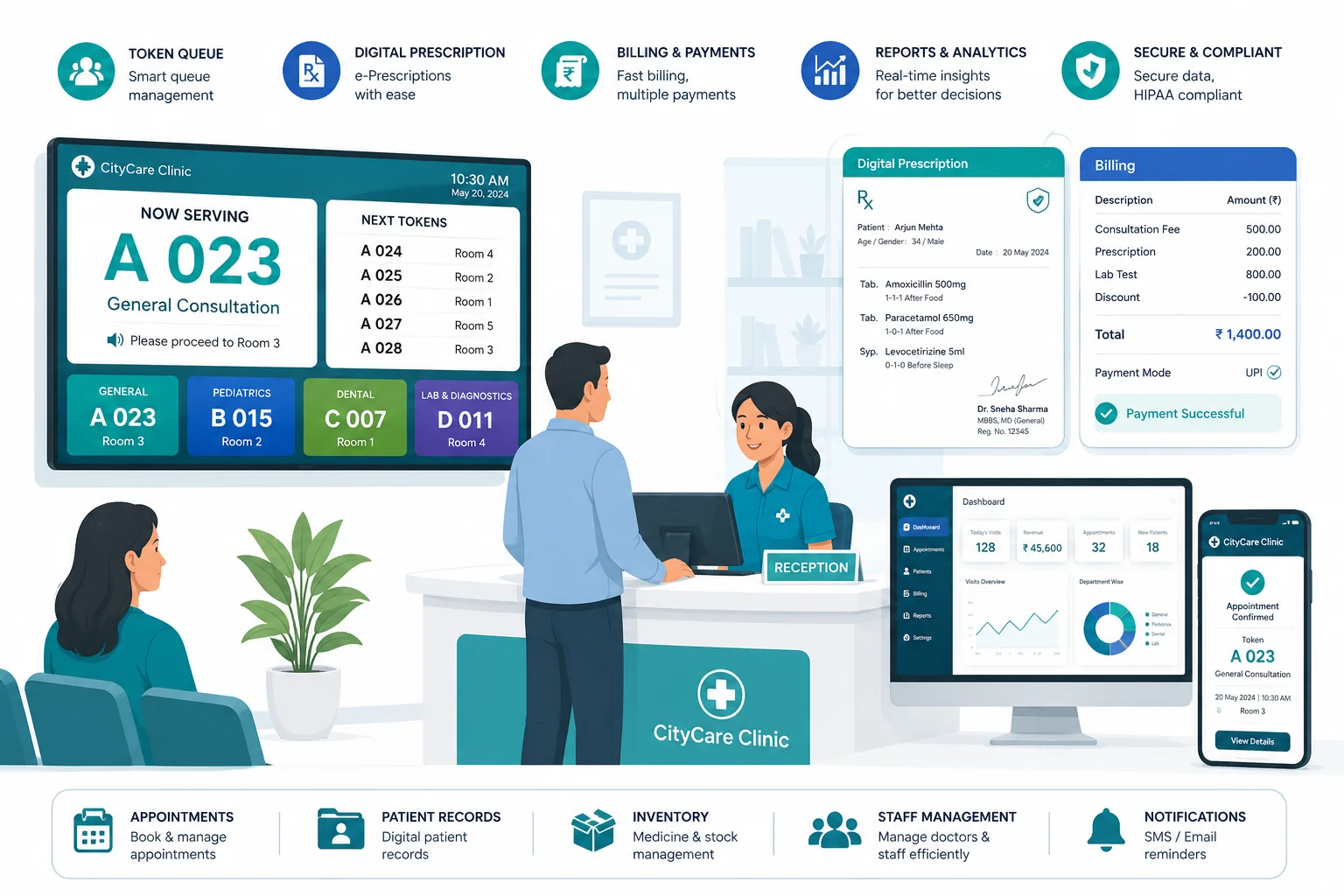
JasMed — token queue, digital prescriptions, billing and reports

Real-time token queue

A single source of truth on one PC drives every browser and the waiting-room TV. Call, start, miss, re-insert and emergency — all in one clean flow.

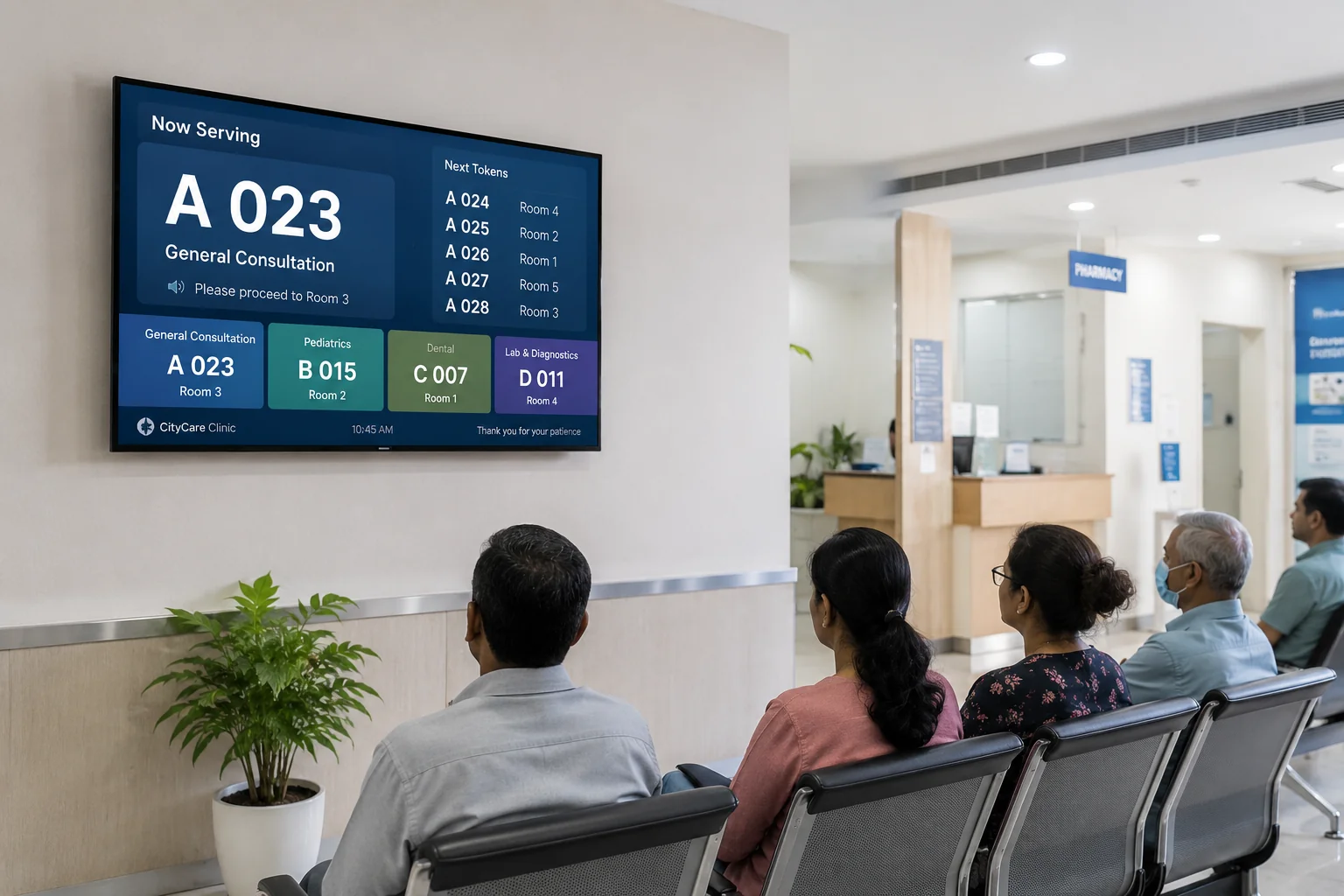
Android TV announcements

Token calls announced by name with text-to-speech on a dedicated waiting-room TV app. No extra hardware, no internet.

Secure & offline by design

Runs fully on your LAN. Patient PII never leaves the premises, and a strict public/private boundary keeps clinical data off the public screen.

Self-healing realtime

Every change is sequenced and buffered, so panels and the TV automatically catch up after any network blip — no refresh, no lost tokens.

Digital prescriptions

Built-in medicine catalogue, structured prescriptions and patient records, with dosage instructions in English + Hindi and clean printable letterheads.

Drug interaction alerts

Every prescription is checked against a curated drug-safety list — severity-ranked warnings, from minor to contraindicated, before the Rx is handed over.

Staff chat & calls

Built-in 1:1 chat plus voice/video calling between reception, doctors and admin — real-time on your LAN, nothing leaves the clinic.

Automatic backups

Daily local backups plus an encrypted cloud copy (AES-256) — restore your entire database from the portal even if the clinic PC dies.

Integrated billing

Optional flat-fee billing with revenue reporting — switch it on only if you need it.

WhatsApp & SMS to patients

Welcome, appointment-reminder and feedback messages sent over the WhatsApp Cloud API or DLT-registered transactional SMS, from templates you control. Pro & Pro +.

Lab reports & machine intake

A lab portal for PDF and image reports with offline OCR, plus a watch folder and X-ray/analyzer API — the doctor is alerted the moment a report lands. Pro +.

Reception & doctor Android apps

Tablet apps for the front desk and the consulting room, working over the clinic's own Wi-Fi with no internet. They find the server themselves and keep you signed in. One APK covers all three editions.
How it works

One source of truth, every screen in sync

Every state change follows one path — API, database, then a realtime broadcast. Clients never guess: on each event they re-fetch authoritative state, so the TV and every panel always agree.

  • No cloud dependency — runs on your LAN
  • Reconnecting screens replay missed events
  • Daily auto-rollover keeps token numbers clean
Waiting-room TV showing the live token queue — now serving and next tokens by department
The suite

One platform, three editions

From a single doctor's clinic to a multi-specialty hospital or a diagnostic lab.

Already using JasMed? Sign in to renew your licence, download the latest version, or get the mobile apps.

Mobile apps

The clinic in your hand, on your own Wi-Fi

Two free Android apps that talk only to your clinic's JasMed server — no internet, no cloud account. They find the server themselves and stay signed in. One APK works with Basic, Pro and Pro +.

JasMed Reception

The front desk on a tablet — register patients, take payments, and drive the queue.

Android 7.0+ · 2.9 MB

Download APK

JasMed OPD

For doctors and admins — the consultation screen, prescriptions and the live queue.

Android 7.0+ · 2.9 MB

Download APK

Installed by sideloading: open the link on the tablet and allow installs from this browser. Requires JasMed running on the same network.

Questions

Before you buy

The dozen things clinics ask us most. Anything else, the phone number is at the bottom of this page.

Does JasMed work without an internet connection?

Yes. JasMed runs entirely on the clinic's own network: one PC holds the data, and every other computer, tablet and the waiting-room TV read from it. Patient information never leaves the premises, and a broken internet line cannot stop the queue.

The internet is only needed for the things that genuinely leave the clinic — WhatsApp and SMS messages to patients, the encrypted cloud copy of your backup, and activating or renewing your licence.

What does JasMed cost?

A one-time licence fee for the edition you choose — JasMed Basic ₹10,900, JasMed Pro ₹12,900, JasMed Pro + ₹15,900 — and, from your second year, an Annual Maintenance Contract of ₹6,000 a year. Fees are in Indian Rupees and are payable in advance.

You can pay online by card, UPI or netbanking, or offline by cash, bank transfer or cheque. Buy online or request an activation.

What is the difference between Basic, Pro and Pro +?

They are cumulative — each edition is the one before it, plus more.

  • Basic is a single-doctor clinic: the token queue and TV announcements, departments and per-visit vitals, digital prescriptions with drug-interaction alerts, staff chat and calls, billing, backups and the free Android apps.
  • Pro adds what a multi-doctor or multi-specialty clinic needs: specialty prescriptions (eye power, dental chart, procedures), priced test and procedure catalogues with itemised bills, WhatsApp and SMS to patients, and offline voice dictation.
  • Pro + adds the lab and imaging side: a lab portal for PDF and image reports with offline OCR, machine intake from a watch folder or an X-ray/analyzer API, doctor alerts the moment a report lands, AI record analysis, and appointment deposits.
What is a Machine ID, and why do you need it?

It is a fingerprint JasMed works out from the hardware of the PC it is installed on, the first time it runs. Each licence is bound to one machine, which is what stops a licence being copied from clinic to clinic.

JasMed shows it to you. It is on the activation window the first time the program is opened, and after that on the Licence / Activation screen inside the Administration area, which only your own staff sign-ins can reach.

You never have to type it out: the same screen prints a QR code. Scan it with your phone and the number arrives here already filled in.

How do I install and activate it?

Install JasMed on the one PC that will hold the data — usually reception, and whichever machine stays switched on through clinic hours. On first run it shows its activation window with your Machine ID and a QR code.

Send us that Machine ID with your clinic details, pay the one-time fee, then open JasMed and press Fetch License. A short code by email or SMS confirms it is you, and the licence installs itself — there is no file to save or copy.

Do I need a server or any special hardware?

No. One ordinary Windows PC on the clinic's own network runs JasMed and holds the data. Everything else simply connects to it: other computers through a web browser, tablets through the free Reception and OPD apps, and the waiting-room television through the JasMed TV app.

No cloud account, no monthly hosting, and nothing between your reception desk and your consulting room but your own Wi-Fi.

Are the Android apps free, and what do they need?

Yes — the Reception and OPD apps are free, and one download works with Basic, Pro and Pro +. They need Android 7.0 or newer and are installed by sideloading: open the download link on the tablet and allow installs from your browser once.

They talk only to your clinic's own JasMed server over your own Wi-Fi, so they need no internet and no account. They find the server themselves and stay signed in.

Where is patient data stored, and what happens if the PC dies?

On the clinic's own PC, on your premises. JasMed takes a local backup every day and can also keep an encrypted (AES-256) copy in the cloud, which you can restore from your customer account if that PC is ever lost, stolen or replaced.

The waiting-room display is deliberately kept on the other side of that line: it shows token numbers and departments, never a patient's name.

What happens when my licence expires?

Licences are issued for a fixed term, normally one year. To carry on using JasMed you renew the Annual Maintenance Contract; on payment a new signed licence is issued for the next term and installs through Fetch License, exactly as the first one did.

If you would rather not have to remember, turn on auto-renew: the AMC is charged to the card, UPI or bank account you approve when your term ends, and the licence renews itself. Nothing extra is charged on the day you set it up.

Can I cancel auto-renew?

Yes, at any time. Sign in to your account and use Cancel auto-renew on the licence concerned; it takes effect immediately.

Cancelling stops future charges only. The term you have already paid for is unaffected and runs to its end date, and cancelling is not a refund request. The full position is in our Terms of Service.

Can I get a refund?

A licence is a digital good delivered the moment it is issued, so fees are generally not refundable once a licence has been issued for the term — except where the law requires it, or where we have agreed otherwise in writing.

If you believe a charge was made in error, contact us promptly and we will review it in good faith. See Terms of Service.

How do I get help if something goes wrong?

Call +91-9509454714 or email contact@jasinfinity.com.

If you already hold a licence you can also raise a request from your account and read the reply there, so the whole thread stays in one place.

Ready to get started?

Activate a new licence with your Machine ID, or log in to renew your Annual Maintenance Contract.